Money is a big piece of the puzzle for every successful business, big or small.
A receipt of payment is proof that money changed hands. It’s something that keeps your cash flow healthy and your customers confident.
If you think payments are just about recordkeeping, think again. A rock-solid receipt system makes tax time easier. It also shows your clients you’re dependable and committed to a 5-star customer experience.
In this guide, we’ll define a payment receipt, cover exactly what to include, walk through a real example, and give you a copy-and-paste template you can use on your very next job.
What Is a Receipt of Payment (and How Is It Different From an Invoice)?
A receipt of payment is proof that money has changed hands. It’s a record of the transaction, showing how much was paid and when.
Invoice vs. receipt, in one line: an invoice asks for money before the job is paid; a receipt proves the money has landed.
| Invoice | Receipt | |
|---|---|---|
| Sent | Before payment | After payment |
| Purpose | Requests payment | Confirms payment |
| Includes | Line items, total owed, due date. | Amount paid, payment method, balance remaining (if any). |
Want to know more? Learn how billing on-site or off-site can impact your cash flow
Why Receipts of Payment Matter
- They help with recordkeeping. You can see who has paid and who hasn’t. This strengthens your cash flow and helps commercial customers stay on top of their own payments.
- They can help resolve disputes. A receipt is evidence that can settle a disagreement once and for all.
- Customers use them as proof of purchase. If the work you did will need a warranty claim later, the receipt backs it up.
- You can use them for tax purposes. They help prove business expenses and support deductions. The IRS generally recommends keeping business records, including receipts, for at least three years.
Get paid without the paperwork. With Joist Payments, every invoice you send can be paid online, and every payment automatically generates a branded receipt for your customer, no typing required. [Discover Joist Payments →]
Key Elements to Include in a Payment Receipt
An effective payment receipt is two things: accurate and complete. Here’s what every receipt should have:
| Element | Why it matters |
|---|---|
| Business name and contact details | Your name, address, and phone number so the customer knows exactly who they paid. |
| Customer information | The customer’s name and the job site address. |
| Unique receipt number | Lets you organize and track receipts quickly. Format it however works for you, e.g., 001, 002, or 2026-04-23-01. |
| Payment date and time | Shows exactly when the transaction happened. |
| Description of services | What the customer paid for. You can reference the invoice number instead of repeating every line item. |
| Amount paid | The total received in this transaction only, not including prior payments. |
| Payment method | Cash, check, card, ACH, or online payment. |
| Amount due (if any) | If this was a partial payment, show what’s still owed. |
| Sales tax (if applicable) | If tax was collected on the job, show it as its own line so the numbers add up cleanly on both sides. |
| Transaction or confirmation number | For card or online payments, include the confirmation number from your payment processor. This gives the customer a second reference point if they ever need to look up the charge. |
| Signature line | Optional, but useful for paper or in-person receipts where a physical sign-off adds a layer of proof. |
Sample Payment Receipt
Here’s what a complete receipt looks like in practice. The format stays the same whether you’re collecting a deposit or closing out a final balance; only the numbers change.
Example 1: Receiving a deposit
                          PAYMENT RECEIPT

  Sunrise Painting Co.                      Receipt #: 2026-08-13-01
  14 Elm Street, Springfield, IL            Date: 08/13/2026
  (555) 019-2837 · [email protected]

  Received from:  Maria Chen
  Job site:        212 Birchwood Lane, Springfield, IL

  ------------------------------------------------------------
  Description                                          Amount
  ------------------------------------------------------------
  Exterior painting, deposit for materials & labor      $450.00
  (Invoice #INV-1042, Painting - Front & Side Elevation)
  ------------------------------------------------------------
  Sales tax                                               $0.00
  Amount paid                                          $450.00
  Payment method                                    Credit card
  Confirmation #                                    CH_9284617
  Balance remaining on invoice                        $1,350.00
  ------------------------------------------------------------

  Thank you for your business! Questions about this receipt?
  Call or text (555) 019-2837.
Notice the “balance remaining” line. It’s what turns this from a generic receipt into a deposit receipt; both you and the customer can see exactly how much of the job is still to be invoiced.
Example 2: Receiving a final payment
                          PAYMENT RECEIPT

  Lantern & Co. Photography                Receipt #: 2026-08-13-02
  PO Box 4410, Austin, TX                   Date: 08/13/2026
  (555) 402-7761 · [email protected]

  Received from:  James & Priya Fenwick
  Event:           Wedding photography, 06/06/2026

  ------------------------------------------------------------
  Description                                          Amount
  ------------------------------------------------------------
  Full-day wedding photography package               $2,800.00
  (Invoice #INV-0198, final payment)
  ------------------------------------------------------------
  Sales tax                                               $0.00
  Amount paid                                        $2,800.00
  Payment method                               Bank transfer
  Confirmation #                                   TXN_5521904
  Balance remaining on invoice                           $0.00
  ------------------------------------------------------------

  Thank you for trusting us with your day! Questions about
  this receipt? Call or text (555) 402-7761.
Here, the remaining balance is $0.00, which tells the customer at a glance that the invoice is fully settled and there’s nothing left to chase.
Want this without having to type a thing? Joist automatically generates a receipt like this every time a customer pays an invoice through the app, pre-filled with the job, amount, and payment method. Log in and turn it on under Payments.
Writing a Receipt for a Deposit or Partial Payment
If you’re like most contractors, you’re not always collecting full payment in one go. Upfront deposits for materials, progress payments partway through a job, and final balances on completion all need their own receipt, and each one should show three things clearly:
- The amount paid today.
- What it was for (e.g., “deposit for materials,” “50% progress payment”).
- The balance still remaining on the original invoice.
This matters most at the deposit stage. A homeowner who hands over a deposit before you’ve started prep work wants to see, in writing, that you’ve received it and how much of the job is still to be invoiced. A clear deposit receipt does that in one glance and heads off the “did you get my payment?” text three days later.
Types of Receipts and Formats
Digital Receipts
Digital receipts are sent by email or stored online using software.
This format avoids paper clutter and protects your records from physical damage. It also allows you to access previous receipts fast.
Say a customer asks for a copy months later. You can find and resend it in seconds. Easy!
Digital receipts also make life easier for your bookkeeper and accountant. Everything is already saved and searchable.
Paper Receipts
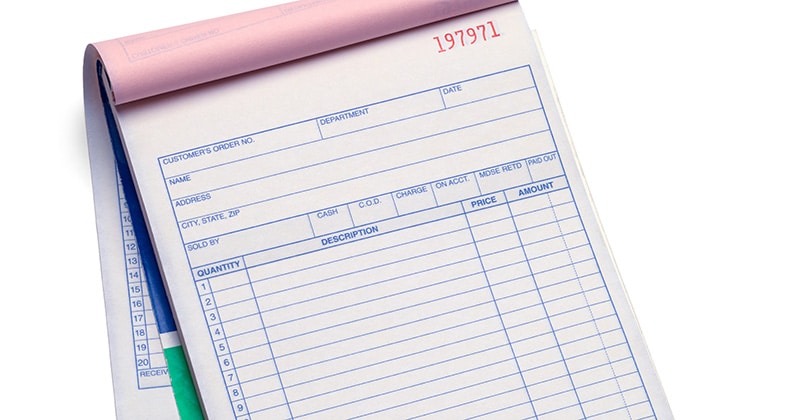
Paper receipts are still useful. You can use them on job sites where Wi-Fi isn’t exactly reliable or for customers who prefer physical documents. You can use a pre-printed receipt book or handwrite a simple receipt with all the key details.
Paper receipts provide immediate proof of payment. You don’t need apps or devices, either.
Just make sure your handwriting is clear and that all information is accurate to avoid issues later.
Customizable Receipt Templates
Customizable receipt templates mean you don’t have to start from scratch every time. You create a consistent and professional format.
You can build templates in Excel or Google Docs, or use templates provided by invoicing software.
Templates save time by reducing repetitive work. They also ensure that your receipts always include the necessary details.
They create a more professional image, too. This builds customer trust and makes your business look more established.
Automatic Receipts
Automatic receipts are sent to the customer the minute a payment is received — no manual work required.
This format saves time. It also ensures the customer gets immediate confirmation of their payment, which can be reassuring.
Take a look at our 5 Invoice Description Examples For Contractors.
7 Steps to Writing a Payment Receipt
- Start with a template or open a new document. A blank doc in Google Docs, Word, Sheets, or Excel works, or use a pre-made template with fields ready to fill in. Save whichever you use so you’re not starting over next time.
- Add a clear heading. Write “Payment Receipt” in bold at the top. If there’s an invoice number, add “Receipt for Invoice #123” underneath so the receipt and the job are easy to connect.
- Fill in your business info. Name, email, phone number, and license/insurance details if you have them.
- Add the customer’s information. Full name and job site address. List the billing address, too, if it’s different.
- Enter payment details. Date and time of payment, total amount paid, payment method, a short description of the work, sales tax if collected, and any balance still due.
- Note any special terms. Financing agreements, discounts, or deposit arrangements all belong here.
- Include a unique receipt number. Use a simple sequence (001, 002) or a date-based format (2026-04-23-01), whichever is easier for you to track.

Receipt Management Best Practices for Contractors
Send receipts promptly. More than seven in 10 customers want immediate service. So, as soon as you’re paid, send the receipt. Don’t rely on memory; prompt receipts build trust and save you from the awkward “did I pay you?” conversation later.
Keep digital copies, always, and keep them secure. Cybersecurity is important for businesses of all sizes. Whether you use an app, a spreadsheet, or scanned paper receipts, ensure cloud backup runs continuously so your records survive if a laptop breaks or is stolen. These files contain customer names, addresses, and payment details, so use strong passwords and turn on two-factor authentication wherever you store them.
Stay organized. Paper receipts: use a labeled folder sorted by month or project. Digital receipts: organize folders by year and client, for example Receipts > 2026 > April > Chen_Exterior_Paint.
Know the retention rules. The IRS generally recommends keeping business records, including receipts, for at least three years in case of an audit. If you’re ever unsure, a longer retention window is always the safer bet.
Related Article: How to Write an Invoice for Construction Work (with Free Template)

FAQ
How do you write an actual payment receipt?
What do you write on a payment receipt?
How do you write “payment received”?
What is the best format for a payment receipt?
Tips for Making Receipts Look Professional
- Don’t build receipts from scratch every time. Use a template or software that fills in your details automatically.
- Include the right amount of detail. Payment amount, method, date, and a quick job summary, no more, no less.
- Use the same format and logo every time. Consistency builds recognition and trust.
- Send it on time. A prompt receipt shows respect for the customer’s time.