Describe the job, and let AI draft it for you. So you spend less time on paperwork and more time getting paid.
Paperwork Shouldn’t Be the Hardest Part of the Job
After a long day on the jobsite, filling out an invoice or estimate by hand is usually the last thing you want to do. Typing up every line item, remembering exact costs, writing it all out so it looks professional—it adds up.
Maybe you wrap up a job at 6pm and just want to head home instead of writing it all up from memory. And when invoicing gets pushed to “later,” getting paid gets pushed to later too.
That’s exactly the problem Joist’s new built-in AI tools are designed to solve.
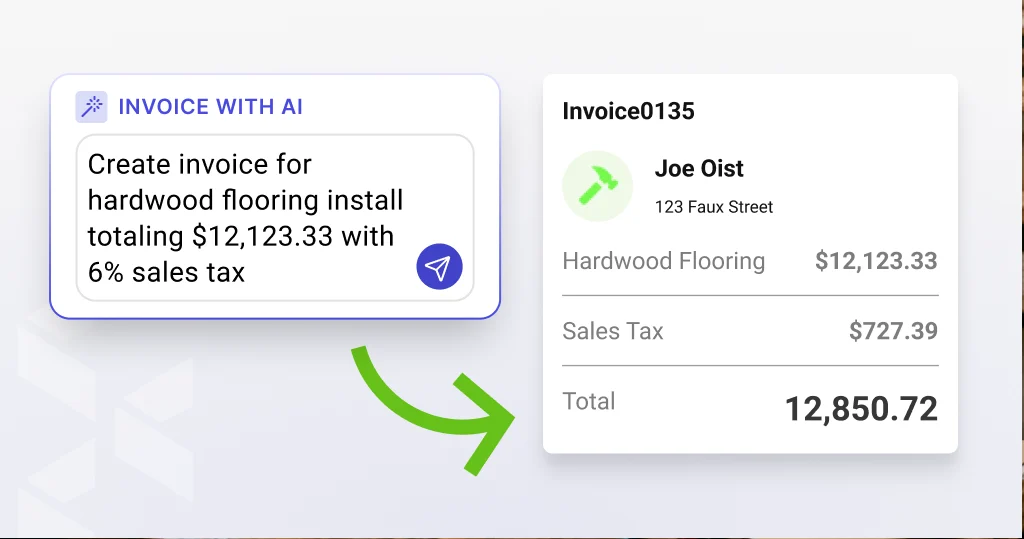
Introducing AI Invoice and AI Estimate
With Joist’s new AI Invoice and AI Estimate, you don’t have to start from a blank document. Just describe the work—type it or say it out loud—and AI turns your description into a full draft in seconds.
You’re always in control. Review the draft, make any edits, and send it when it’s ready. Nothing goes out without your OK.
This isn’t AI replacing your judgment. It’s AI taking the first pass at the paperwork so you don’t have to.
“We built AI Invoice and AI Estimate because we know that paperwork can take up a lot of time contractors don’t have to spare. Now you can describe the work in your own words, and Joist hands you a draft to review. So you can spend less time typing and more time getting to the next job.”
— Ryan Chong, Product Manager, Joist
Two New Ways Joist’s AI Makes You More Productive
AI Invoice: Describe the job you just finished, and get a full invoice draft in seconds instead of filling out every line by hand.
AI Estimate: Same idea, for the front end of the job. Turn a quick description into a customer-ready estimate draft.
Part of a Growing Suite of AI Tools in Joist
AI Invoice and AI Estimate are the newest additions to a suite of AI tools built right into Joist. They join AI Note Improver, which helps turn rough notes into clear, professional language on any estimate or invoice.
Together, they can cover a job from start to finish: draft an estimate with AI before you even leave the driveway, use AI Note Improver to polish the details, and once the work is done, draft the invoice with AI in the same way. Each step still ends with you reviewing, editing if needed, and sending when it’s ready.
It’s a small shift with a real effect: less time behind the screen, more time on the tools.
How to Start Using AI Invoice and AI Estimate Today
Step 1: Open Invoices or Estimates in Joist on web, iOS, or Android.
Step 2: Tap the Invoice with AI or Estimate with AI option; then type or speak a quick description of the job.
Step 3: Review your draft, make any edits, and send it when it looks right.